
Running a business can be both exciting and exhausting — especially when you throw ADHD or any neurodivergence into the mix.
You’ve got big ideas and enthusiasm for all these new things that you could do… until you don’t, and your energy runs dry.
Then everything can feel overwhelming. Even the small tasks or decisions can tip you over the edge.
But it’s not all doom and gloom (you’ll be glad to hear!).
There are now a plethora of tools — including AI — that you can use to help you out. And I’m about to give you a list of some of my favourites.
These are tools that genuinely help you manage the demands of your business, work with your neurodivergent brain (not against it), and save time and energy for where it’s needed.
1. Goblin Tools
Goblin Tools is a fab collection of tools — including a task-breaker, tone checker and time estimator.
The Magic To Do tool will break down a task, for example:
“Write 2 blogs for next month.”
That can seem like too big a task — where do you start?
With Magic To Do, you set the level of how detailed you want the breakdown to be, and then click the “break down item” button. Below, you can see how this example works.
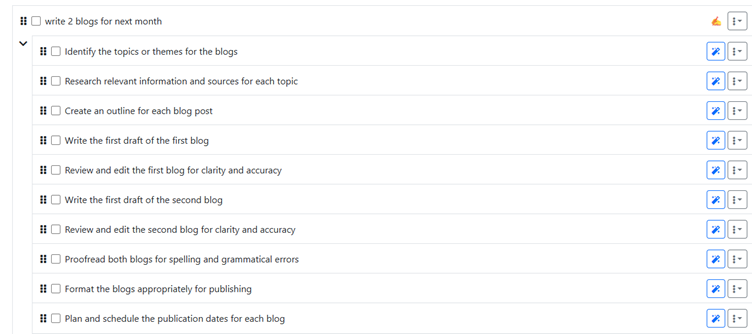
It’s not perfect — sometimes it won’t be quite right — but you can edit, add, and remove tasks as needed.
It’s a starting point, and when you’re struggling to prioritise what you need to do (or even start the task), this can get you moving.
🧠 Why it works: It gets you from stuck to starting. It turns overwhelm into action, quickly.
2. ChatGPT
Since discovering my ADHD brain, I’ve seen a whole new side to ChatGPT (and of course the other AI platforms — but ChatGPT is currently my go-to).
It isn’t about creating content for me — it’s about working with me to:
- explore ideas
- create actionable lists
- generate title and content theme ideas
It’s a place where I can ‘talk’ through ideas, then go on to implement them, park them, or completely discard them.
I get ChatGPT to ask me questions to tease the necessary information from me. It’s not about GPT writing something on my behalf — it’s about getting it to format my ideas into the response I need.
My words and my voice — with the focus and memory of ChatGPT. (Although I will point out that it’s not infallible — sometimes I need to remind it of things!)
My top uses for ChatGPT:
- Idea generator — blog themes, social media topics, etc
- I’ll give it a transcript (from Otter.ai), and it turns my rambling into a blog format
- A gym buddy! I tell it how long I’m going to be at the gym and it gives me a personalised workout, based on predefined rules we’ve built
🧠 Why it works: Your brain’s fast — and ChatGPT keeps up. It holds your thoughts so you don’t have to.
3. Todoist
I’ve been using Todoist for years, and it’s my hub of reminders.
I’ve got the app on my phone, which means I can add a task pretty much whenever — either setting a date/time to do it, or just using it as a quick note to remember something.
You know when you’re lying in bed and suddenly wonder whether you did that important task?
➡️ Add it to the list for tomorrow.
➡️ You don’t need to keep it in your head.
I often find myself keeping things in mind… and then forgetting more. Get it out of your head then and there.
You can use Todoist for projects, parked ideas, reminders, regular tasks — so much!
🧠 Why it works: It’s a memory bank. When you can’t rely on your brain to remember everything — you can rely on Todoist.
4. Physical Weekly Planner
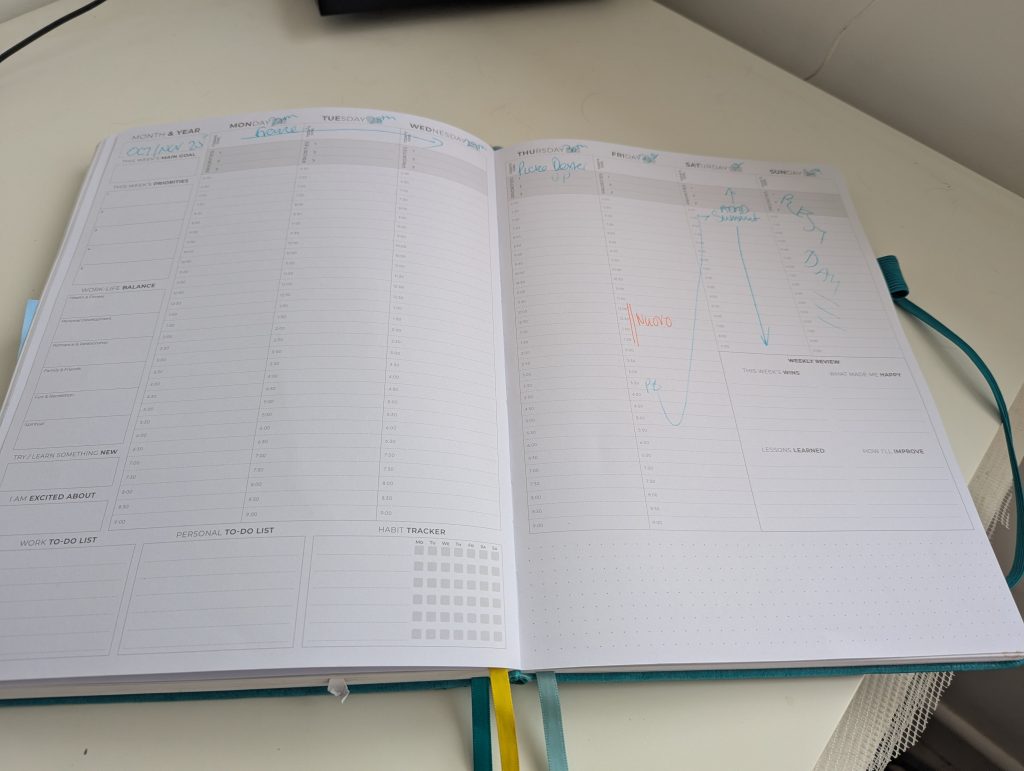
I do a lot of things digitally — and I have a digital calendar — but I love a tactile diary or planner.
(Also: I have a love of stationery, so this is a great excuse to buy beautiful things for my office.)
There’s something different about writing out your priorities and plans.
Seeing the week laid out visually gives you a sense of structure — and a clear idea of what really needs to be done.
Part of my daily planning is to set my 3 priorities for each day — the things I must get done — and make sure they happen.
Top tip: Use erasable pens — that way you can stay flexible without making a mess!
🧠 Why it works: It helps visualise time. It gives structure without rigidity — and lets you reset each week.
5. Pomodoro Timer
This is a time management technique which gives you both time to focus and time to rest.
You work for 25 minutes (a Pomodoro), followed by a 5-minute break. After 4 Pomodoros, take a longer break — 15 to 30 minutes.
I use pomofocus.io — which not only has a timer but lets you add tasks so you know what you’re working on.
I find it easier to stay on track with boring tasks because I know there’s always an end in sight. And if I’m hyperfocusing? It ensures I stop and rest before crashing.
🧠 Why it works: You get momentum without overload. The structure keeps you on track — and the breaks stop you hitting the wall.
6. Google Keep (or any notes app)
Get everything out of your head and into a note.
Plans and ideas. Things you keep forgetting. Links you want to save. This becomes a catch-all for all your thoughts — without having to create a task or interrupt your workflow.
Here’s what’s in my Google Keep right now:
- Info + text to paste into Zoom chats when I’m online networking
- A list of films I want to watch
- A packing list for the kitten 🐱
- ChatGPT prompts I’ve come across
- Links to useful articles
🧠 Why it works: It stops spirals and tangents. You don’t lose good ideas — but you don’t get lost in them either.
7. Whiteboard or Visual Wall Space
Out of sight, out of mind — so keep it in sight!
There are so many benefits to this:
- You externalise your thoughts
- It quiets your mind
- You can see progress
- It motivates you to keep going
Think of those big fundraiser posters — “£5000 to save the village hall!” — with a progress bar you colour in.
That feels good, right?
Now create your own version — based on the behaviours, habits, and goals that matter to you.

🧠 Why it works: It’s a visual reminder, a tracking tool, and a dopamine hit all in one. And sometimes? Seeing the full picture in front of you is all you need to feel grounded.
These aren’t fancy hacks — I don’t think I’d even call them “hacks” at all.
They’re tools that help brains like ours feel less overwhelmed.
They help you actually run your business.
☕ Grab a cuppa and take some time (maybe 25 minutes 😉) to think about how you could implement some of these into your life and work.
What difference could they make?
And of course — if you want support to get things done in your business, get in touch to find out how you can work with me.